Sending attachments over email causes version confusion, exposes outdated pricing, and clutters your champion's inbox.
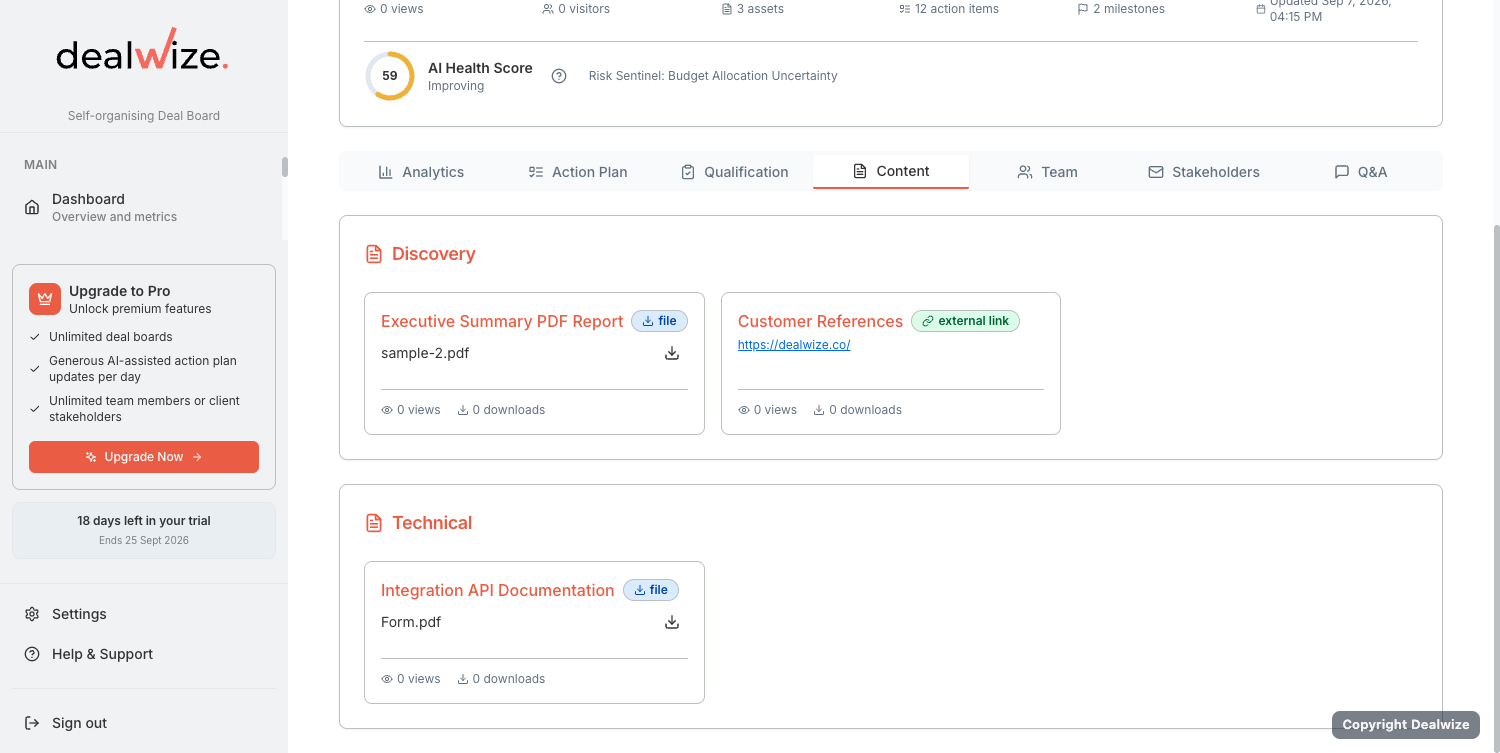
Dealwize Deal Boards include a centralized Content Room alongside your Mutual Action Plan. Sellers can curate sales presentations, technical whitepapers, security certifications, and commercial proposals in one branded digital space—complete with in-browser previews and direct linkage to evaluation milestones.
1. Supported Document & Asset Types#
Dealwize supports a wide range of collateral formats to accommodate every stage of enterprise evaluation:
| Asset Type | Supported Formats | Recommended Use Cases |
|---|---|---|
| PDF Documents | .pdf | Commercial proposals, SOC 2 audit reports, Master Services Agreements (MSAs), security questionnaires. |
| Presentations | .pdf, .pptx, slide decks | Executive pitch decks, custom solution architectures, board-level summaries. |
| Spreadsheets | .xlsx, .csv | Business case calculations, ROI models, data migration templates. |
| Media & Video | Embedded video (.mp4, Loom, YouTube) | Tailored product walkthroughs, executive greetings, feature demonstration recordings. |
| External Links | Secure web URLs | API documentation, interactive sandboxes, status pages, knowledge base articles. |
| Rich Text Notes | Formatted text & HTML | Meeting executive summaries, custom implementation timelines, next step briefings. |
2. Organizing Assets into Custom Categories#
To keep complex evaluations structured and easy for buyers to navigate, assets are grouped into logical Categories:
- Open your deal in the Deal Board editor (
/deal-boards/[id]/edit). - Navigate to the Content section.
- Click Add Category to create a custom section (e.g. Executive Overview, Technical & Security Validation, Commercial & Legal).
- Drag and drop uploaded assets into their respective categories, or reorder categories to reflect the logical flow of the evaluation.
  ┌─────────────────────────────────────────────────────────────┐
  │                 Acme Corp Deal Board Content                │
  ├─────────────────────────────────────────────────────────────┤
  │ ▼ 1. Executive Overview                                     │
  │   ├── Hybrid Cloud Architecture Proposal.pdf                │
  │   └── Executive Walkthrough & Business Impact (Video)       │
  │                                                             │
  │ ▼ 2. Security & Compliance                                  │
  │   ├── SOC 2 Type II Compliance Report.pdf                   │
  │   └── Cloud Penetration Testing Summary 2026.pdf            │
  │                                                             │
  │ ▼ 3. Commercials & Contracting                              │
  │   ├── Master Services Agreement Draft v1.2.pdf              │
  │   └── 3-Year ROI & TCO Financial Model.xlsx                 │
  └─────────────────────────────────────────────────────────────┘
3. In-Browser Document Previews#
Enterprise buyers are often reluctant to download email attachments due to corporate IT security policies.
Dealwize provides built-in, secure in-browser previews:
- PDF Previews: Evaluators can read multi-page proposals and security reports directly inside the dealboard viewer without downloading them to their local machine.
- Integrated Media Player: Video walkthroughs stream directly inside the browser (
MediaPlayer.tsx), providing a polished, high-touch executive experience. - Controlled Download Permissions: If a stakeholder has Read-only access, they can preview files in-browser but cannot download raw files to disk, protecting sensitive commercial IP.
4. Linking Documents to MAP Milestones#
The most powerful feature of Dealwize's content architecture is Milestone Linking.
Instead of asking buyers to search through a document folder for the relevant contract or security spec, you can tie specific documents directly to their corresponding Mutual Action Plan items:
  Action Item: "Infosec Team SOC 2 Review & Vendor Clearance"
  Owner:       Elena Rostova (Infosec Lead)
  Deadline:    18-Sep-2026
  Linked File: [📄 SOC 2 Type II Report 2026.pdf]  <-- Click to Preview
How to Link an Asset to an Action Item:#
- In the Deal Board editor, scroll to your Mutual Action Plan.
- Click on the action item or milestone (e.g. Complete InfoSec audit).
- In the item details modal, select the Linked Asset dropdown.
- Choose the uploaded document from your category list (e.g. SOC 2 Type II Compliance Report).
- Save the item.
When the customer opens their Stakeholder View, a direct document preview button appears right beside that milestone. With one click, their InfoSec lead opens the report, reviews the controls, and checks off the task.
5. Engagement Telemetry on Content#
Every document view and download in the Deal Board is tracked:
asset_viewed: Logs when a buyer opens a document preview in-browser, capturing timestamp and viewer identity.asset_downloaded: Logs when an authorized stakeholder downloads a file to their local machine.
This intelligence eliminates sales guesswork. You know exactly when legal opens your redline or when the CFO downloads your pricing model before you ever jump on a call.