In complex enterprise evaluations, dozens of detailed questions emerge across technical architecture, security compliance, pricing structure, and implementation timelines.
When these questions are scattered across multi-recipient email chains, answers get lost, different stakeholders ask the same question repeatedly, and evaluation momentum stalls.
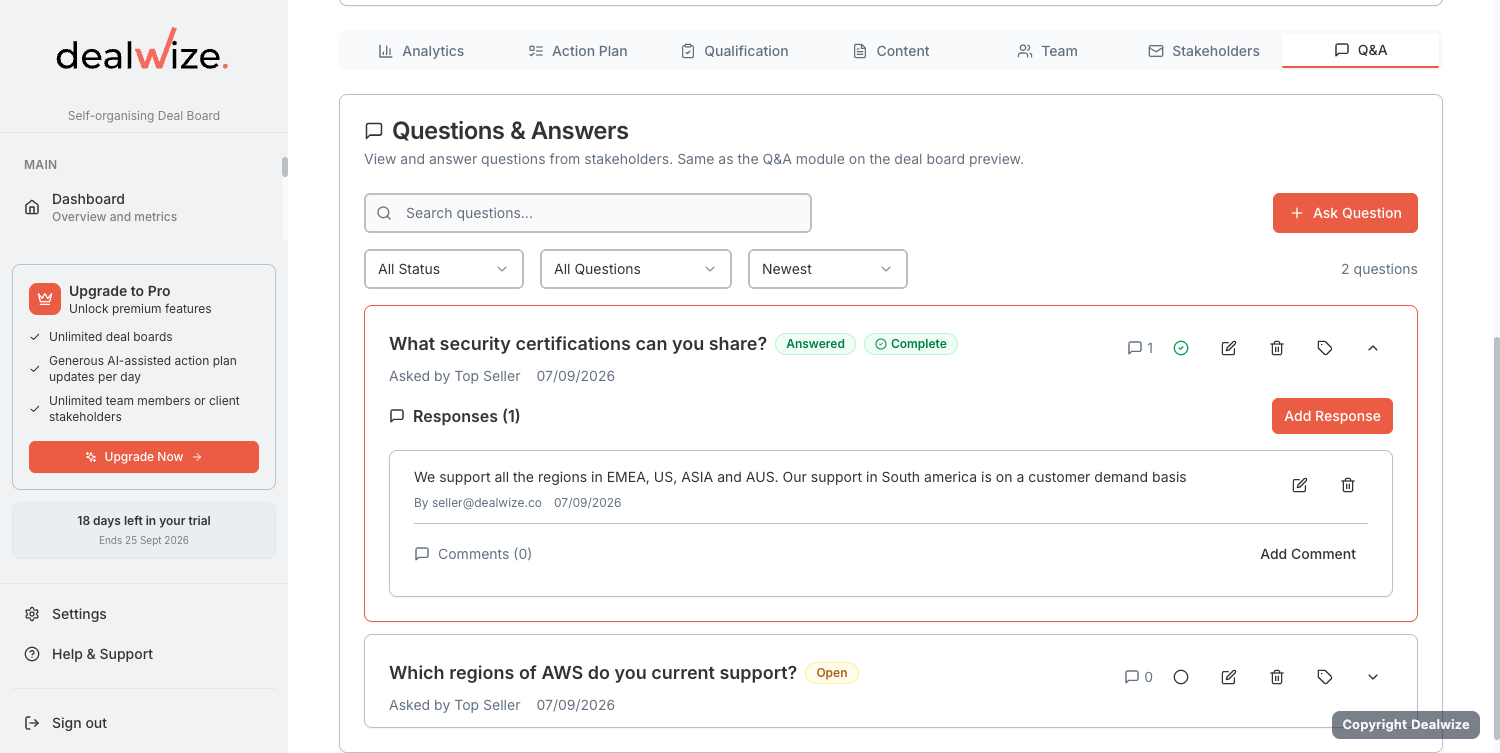
Dealwize provides a dedicated Interactive Q&A Module embedded directly in your shared Deal Boards (micrositeQAService.ts), allowing buyers and sellers to resolve inquiries collaboratively in context.
1. Two Question Scopes: Board-Level vs. Asset-Level#
Unlike generic chat widgets, Dealwize anchors discussions directly to the relevant deal collateral:
  ┌─────────────────────────────────────────────────────────────┐
  │                   Deal Board Q&A Structure                  │
  ├─────────────────────────────────────────────────────────────┤
  │ 1. Dealboard-Level Questions                                │
  │    • "What is our agreed pilot start date and milestones?"   │
  │    • "Can billing be split across two fiscal entities?"     │
  │                                                             │
  │ 2. Asset-Level Contextual Questions                         │
  │    • Attached to: "Master Services Agreement Draft.pdf"     │
  │      └── "Can we modify clause §8.2 on IP indemnification?" │
  │    • Attached to: "SOC 2 Type II Audit Report.pdf"          │
  │      └── "Where are EU backup snapshots hosted?"            │
  └─────────────────────────────────────────────────────────────┘
1. Dealboard-Level Inquiries#
- Broad questions covering commercial terms, target rollout dates, implementation support, or executive objectives.
- Accessible anytime via the Q&A Floating Button or the dedicated Q&A panel on the board.
2. Asset-Level Contextual Inquiries#
- Questions anchored to a specific uploaded document (e.g. Master Services Agreement, Infosec Whitepaper, or Architecture Spec).
- Documents with active inquiries display visual badge counts (e.g.,
💬 2 questions on this file), allowing evaluators to see existing answers before asking duplicate questions.
2. The Question Resolution Lifecycle#
Dealwize manages questions through a clear operational workflow:
- Status Tracking:
open: Newly submitted question awaiting vendor or champion response.answered: Official response provided by the sales engineer or account executive.closed: Fully resolved inquiry signed off by the asking stakeholder.
- Urgency Flagging (
isUrgent): Buying committee members can flag time-sensitive blockers as Urgent, alerting the account team for immediate triage. - Threaded Responses & Collaborator Comments: Sales engineers and reps can draft internal collaborator notes before publishing official responses visible to the buyer.
- Departmental Tagging: Route inquiries using tags (e.g. Security, Legal, API/Integration, Pricing) so the right specialist can answer quickly.
3. Best Practices for Dealboard Q&A#
- Answer in the Board, Not in Email: When a buyer emails a question, post the answer in the Deal Board Q&A and link to the document. This ensures the entire buying committee benefits from the clarification.
- Pre-populate Frequently Asked Questions: When sharing a technical proposal or security report, proactively add common Infosec answers to save days of back-and-forth review.
- Audit Open Inquiries Before Sync Calls: Use open Q&A items as the running agenda for weekly evaluation calls to ensure blockers are dismantled systematically.